Prioritization Matrix
A task manager is only as effective as the logic powering it. We dissect how top-tier apps handle prioritization, contexts, and energy levels.
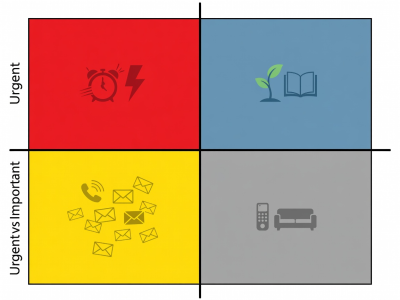
The Eisenhower Integration
The Prioritization Matrix (often attributed to Dwight D. Eisenhower) divides tasks into four quadrants: Urgent & Important, Important but Not Urgent, Urgent but Not Important, and Neither. Modern digital apps facilitate this through tagging, filtering, and smart lists.
App Comparison: Handling Priority
| Application | Priority Feature | Best Use Case |
|---|---|---|
| Todoist | P1 - P4 flags | Quick visual triage during daily planning. |
| Things 3 | Today / This Evening | Energy-based sorting for personal tasks. |
| OmniFocus | Custom Perspectives | Deep, granular context filtering (e.g., "At Office", "Low Energy"). |
| TickTick | Eisenhower Matrix View | Built-in quadrant visualization out of the box. |
Building Your Daily System
Do not let your task manager become a graveyard of good intentions. We recommend the "1-3-5 Rule" implemented via tags: every day, schedule 1 massive task, 3 medium tasks, and 5 small tasks. Configure your app's daily view to strictly show only these 9 items, hiding the rest of your backlog behind a specific "Review" project.
68%
Of professionals experience task paralysis when faced with lists exceeding 15 items. Curation is vital.